A TapeOp Magazine opinion piece recently presented the dumbest anti-ABX argument I’ve heard to date; and I’ve heard a lot of really stupid arguments against ABX comparisons. Allen Farmelo's article title pretty much says it all, “The Problem with A-B'ing and Why Neil Young is Right about Sound Quality.” Because I’m a nice guy and it’s early in the morning, I’m not going to spend any time whacking away at the fact that there are so many old, deaf, mediocre rockers who imagine they possess golden ears. Neil Young, probably the single most prolific creator of awful sounding records in human history, is close to the last guy on the planet who should be promoting high resolution audio. Nuts, I went there anyway. So much for being a nice quy.
However, the bullshit argument here is, “. . . we hear people talk about how one can't make out the difference between a hi-res MP3 and a 24bit WAV file (assumedly a difference similar to the one Neil Young feels is worth fighting for). Admittedly a hi-res MP3 and a 24bit WAV are relatively close enough in resolution that many people will not be able to pick them out in an A-B test.
“But, we don't live with music like that. If your'e [sic] anything like me, you listen to a lot of music in a lot of styles and - over the course of, say, a month - perhaps you've absorbed well over a hundred listening hours across many different albums on a few different playback systems.”
It gets better.
To “prove” his point, he uses what he imagines to be an analogy, “For example, when I started living with my partner I introduced her to what I call ‘good coffee.’ At first she kind of shrugged it off as my snobbery at work, and she couldn't really taste the difference. But then, after months of drinking the good stuff, she found herself to be a bit of a coffee snob, too. She could taste the difference because she had, simply, spent time with the good stuff. The coffee revealed itself to her, slowly and subtly. Her palate developed. And the thing about good coffee is that it holds more detail, nuance and, therefore, interest.
“But it takes a while to become aware of that depth and complexity. Had she done a flip-flip-flip A-B and made her choice to only drink the cheaper stuff because, ‘you know, they're basically the same,’ she'd have missed an opportunity to develop her palate.”
Farmelo is avoiding the simple test that would at least prove his coffee snob argument; now that she has developed “her palate” can she tell the difference when she does a “flip-flip-flip A-B?” If she can’t, you’re still full of shit. Likewise, way back in 2004 the Boston Audio Society performed a simple, repeatable ABX test of ancient 44.1kHz/16-bit technology and a 96kHz/24-bit source and, so far, no high-res audio equipment or recording professional or company has found a way to prove this test was incomplete or inaccurate. Humans love their delusions. One of the most inane arguments I’ve heard from an “audio professional” was the statement “I know what I know and I hear what I hear.” Totally incomplete. Doofus should have said, “I know what I think and I know what I think I hear.” It’s a useless statement, but accurate.
There are a lot of reasons why I don’t take the fruitcakes and goofballs who call themselves “audio engineers” seriously, but this terror of reality and the limitations of their own hearing is high on the list. No, I don’t take sanitation engineers seriously either; they are just old fashioned, hard-working garbage men (or women).

Showing posts with label recording magazine. Show all posts
Showing posts with label recording magazine. Show all posts
Tuesday, June 12, 2018


Tuesday, April 17, 2018
Getting Off of the Bandwagon
Mix Magazine has always been a marketing tool for the equipment industry. Rarely, the magazine actually prints an article that is of some use to a recording tech. Constantly, the pages are filled with pseudo-reviews that are barely more (or not more at all) than reprints of the product’s advertising literature. I’m not just picking on Mix, because that has been the industry standard since Recording Engineer/Producer died.
The Mix Studio Blog: article, “To Subscribe, Or Not To Subscribe” is a typical bullshit Mix faux-informational article promoting, while trying to pretend it isn’t, Pro Tools’ subscription policies. The author pads his pr work with broad statements like:
- "Subscriptions also make it possible for developers to give customers access to a broader range of products for the money than is feasible through the purchase model."
- "it takes a mental adjustment to stop thinking of your software as something you own, like your microphones or audio interface, and to consider it a service that you pay for. Some advocates of subscriptions respond to that concern by saying that you never really owned your software, anyway, you just licensed it."
- "Imagine if the company that makes your DAW goes belly up and your software ceases to function."
- "Actually, there's already one DAW developer that has a de facto subscription-only policy. Although it allows you to choose between a perpetual license or a subscription, those who choose the former also have to pony up for an ‘upgrade plan’ to get any updates (even maintenance ones)."
- "Outside of the music space, some pretty major software titles, such as Microsoft Word and the Adobe Creative Suite are available on a subscription-only basis (I'm writing this column on a subscription version of Word, because I don't have a choice), and it could be that it's just a matter of time before that's the case with a lot of music production software, as well."
In 2004, I wrote “Who Would That Inconvenience?” In that article I wrote, "Software manufacturers estimate that they've 'lost' somewhere between two hundred million to a billion-zillion dollars due to software bootlegging. According to their estimates, everyone on the planet would have purchased their products if they hadn't had access to illegal versions. Some of us would, surely, have bought those products several times if legal channels were the only way we could obtain software. 
In “Gotta Have It” I wrote, “People did perfectly professional work on Sound Tools, the first 4-track version of Pro Tools, and the first serious multi-track version of Pro Tools (2.0) that produced the first Grammy winner for Digi. Marketing squirrels can yak about why we ‘need’ whatever crap they're pedaling, but the fact is we don't. We've had all the tools we need to record good audio, digitally, for at least a decade.” We need Avid, Apple, Steinberg, etc less today than in 2012 when I wrote that essay. Software updates may be the single best argument for disbelieving the whole supply and demand delusion. Software that is doing every job necessary perfectly well suddenly becomes unusable because a new, unproven, probably buggy version of that same piece of code is available? Nonsense.
Today, I’m doing fine with my 2007 MacBook Pro and 2006 Mac Pro tower machines, both running OS X 10.7.5. My Win7 machine is a 2007 Dell Latitude. All three machines run Pro Tools 10, the Dell a little more reliably than the MacBook Pro. Both Macs also run Logic 9, Mainstage, Soundtrack Pro, and Waveburner flawlessly. I have done dozens of video projects on the Mac Pro running Final Cut Studio. I’ve seen the newest versions of Pro Tools, Logic, and Final Cut and I can’t find a reason to “need” them. Logic X, in particular, is really cool looking and I can imagine using many of the new features, once I struggled through the learning curve on another weird, counter-intuitive Apple interface. But, as usual, Apple would require me to buy new machines, use the latest OS, along with the learning curves for those formidable obstacles. For what? Honestly, just thinking about the hassle of all that makes me want to quit messing with software at all.
As for that wimpy, irritating “I'm writing this column on a subscription version of Word, because I don't have a choice” whine, grow the fuck up and grow a pair while you are at it. “Don’t have a choice” my ass. You can do what ever you want as long as you are smart enough not to fall for the “I need to be state-of-the-art” fallacy. For example, I know quite a few highly functional people who are still doing fine running Office 2003, 2007, or 2010. In fact, I run 2003 on my Windows machines and 2011 on my MacBook Pro. If I “upgrade” to anything, it will be Office 2010 for the Win7 machines. Microsoft says Win7 and Office 2010 will be maintained at least until 2020. So, I don’t have any motivation to go newer until at least 2020.
There is no chance that I will ever become a software subscriber. Worst case, I’ll be using Open Source software for everything after my current equipment and OS becomes really obsolete. By then, Open Source software may very well be superior to the expensive brands. The newest version of Audacity is currently very competitive with the version of Pro Tools I am running and it is cross-platform friendly with many versions of OS X, Windows, and Linux and it uses practically every format of plug-in on all platforms. As for a subscription for Office, forgetaboutit. Never gonna happen. I already use Open Office almost as much as Office and it is also cross-platform compatible.
Tuesday, May 16, 2017
Why Bother?
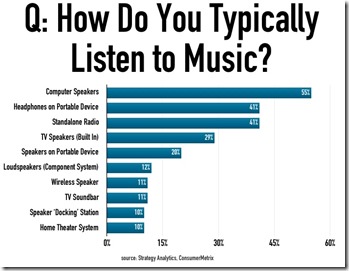
“Headphones connected to a portable device followed with 41% of respondents, alongside stand-alone radio, also with 41%. Surprisingly, TV speakers were also highly-ranked, with 29% ticking that box.”
While nothing about this information is surprising, that doesn’t keep it from being depressing. More out of habit and curiosity these days, I still read Mix Magazine, TapeOp, Recording, ProSoundWeb, and Pro Sound News. I’m mostly entertained by the seriousness audio “engineers” (an oxymoron if there ever was one) take their degraded “craft.” Almost by reflex, when I read an interview with some kid who has decided he’s the next incarnation of Tom Dowd (No, he won’t have the slightest idea who Tom Dowd was.) I chase down a few examples of the music he refers to as examples of his work. Invariably (Yes, I do know what that word means.), it will be some awful sounding collection of distortion, overused effects, trite synthesizers, and horribly recorded drums.
The critical feedback loop between musicians and their vanishing customers has been wreaked by “portable devices” and the delusional pipedream that some whackos have that high resolution audio will change any of that is nuts. I suppose I should be happy with the resurgence of vinyl, since you can’t get that shit on to a cell phone? If you know me, you know I think going back to vinyl is about as silly as abandoning cars for horses. It’s not the vinyl that matters, it’s the amplification and speaker systems, dumbasses.

My mother had convinced him to buy an RCA console system, but he decided that took up too much room and it ended up in the basement, too. It really was pretty awful, but slightly better sounding than my Webcor. 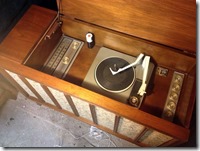
By then, I had long since graduated to component stereo equipment, then band sound systems, and, finally, recording studio equipment for my home audio system. Our living room system (aka “Home Theater System”) is still a decent receiver and a pair of JBL studio monitors. The down side to that is that, if I bother to listen at all carefully, it’s pretty obvious that Pandora broadcasts in a mediocre MP3 format. Usually, I’m not that focused on the music coming from the living room when I’m working in the kitchen. When I am actually critically listening, I listen to CDs. I’ll put CD quality over vinyl any day.
Too often, when someone under 30 wants to show me some music it will be demonstrated on a cell phone speaker. I have no idea what I’m supposed to get from that experience. I can usually pick out the melody and determine if it is a male or female lead voice. That’s about all I’m willing to invest in that miserable fidelity source, though, which is often disappointing to the person trying to impress me.
To be truthful, if you are a cell phone user I have to suspect you don’t care about fidelity in any form. While I haven’t had a fixed-line telephone for quite a few years, our primary telephone looks a lot like a fixed-line system. Our phone service is provided through our high-speed ISP and an Ooma Tele. The sound quality was a substantial step-up from the fixed-line system provided by Qwest and, later, Comcast in our Twin Cities home. I can, in a few moments, tell if a caller is on a cellphone because the quality is miserable. Always. My guess is if you can tolerate that level of distortion in a voice conversation you aren’t that discerning in any aspect of audio. So, while I’m not surprised that music is being listened to on actual speakers by an audience of 12%-and-shrinking I’m also not impressed by your musical tastes. Your opinion of audio quality is just going to make me laugh, so don’t waste either of our time.
Monday, October 21, 2013
ARTICLE: Putting It All Together
All Rights Reserved © 1999 Thomas W. Day
(Originally published in Recording Magazine, June 1999 Volume 12, Number 9, P20-31, under the title "An Ounce of Cure.")
In the Beginning?
Usually, we collect a pile of equipment and, over time, figure out how to put it all together. More often than not, there isn't a way around this scenario. The only exception I can think of would be that you've just won the lottery and are out to buy everything you've ever dreamed of owning; and will never dream again when that big shopping trip is finished. So, we buy the bits as we find them, find the money, or both.
Then, we find a space in the rack and a pair of empty jacks on the patchbay and on we go. Just like we'd always planned to put things together that way. The bigger the rig gets, the more likely we are to be retroactive about how it's all assembled.
Having money or being famous doesn't seem to keep us from creating audio disaster areas. One of the biggest-buck studios I've visited had some of the worst laid-out equipment I've ever seen. And I've stumbled through dinky, one-bedroom studios with three or four pieces of equipment that were nothing but a tangled rat's nest of cables. Obviously, really pristine layouts exist in either environment, too. Planning and maintenance are what separate the mediocre from the superb.
Planning for Success
Even if you've been growing your equipment collection in the same room since the 60's, it won't hurt to wade your way through a planning exercise. It may identify a spot in your signal path that has been bugging you since you moved into your studio.
While it probably seems like a waste of time, especially if your system only includes a computer and a few MIDI pieces and a mixer, I recommend drawing a schematic of the equipment connection plan. Before you ever connect a cable or plug in a power cord, draw out the equipment you own and determine the best place in the signal path for each piece. A good example of a planned signal path is the block diagram that you'll probably find in your mixer's owners' manual.
If you aren't going to do this layout work on CAD, consider stealing an old Industrial Engineering trick. Make a small, rough drawing of each piece of equipment, piece of furniture, and rack cabinet that you'll have in the room. Cut out the drawings and put them aside for a moment. On scale with your furniture, draw your room, including the lighting and power sources. Now, using a temporary office adhesive, do a few dozen "what ifs" with the equipment and furniture cutouts on your scale studio facility. Eventually, you'll find the best place for everything and make the most use of your available space.
If you can design your rack and instrument layout to absolutely minimize cable lengths, do that too. Electrons like short paths. The shorter your cables, the less likely your wiring will pick up noise and interference from undesirable sources. Short cables also introduce fewer losses in your signal path, due to reactive cabling components (inductance, capacitance, and resistance).
Things that Go "humm" in the Night
An important reason for doing all this planning is to make your system quiet. When you start recording you can add all the noise you want, but a great recording studio has a very low noise floor. You can save yourself a few decibels in signal-to-noise by identifying the best physical locations for your equipment. If you can avoid running low level signal cabling over power transformers, do it. This is the reason that knowledgeable people isolate their power amplifiers from their low level signal equipment. Power amps have big, nasty supply transformers than can couple 60Hz harmonics into just about anything placed nearby.
While we're talking about undesirable noise sources, I should mention a few. Light dimmers, for example, are one of the most insidious things left over from the Evil Empire. There are dimmers specially made to reduce EMI, but they don't always work as well as advertised. Personally, I think it's smarter to design your lighting system so that you can illuminate what you need illuminated. Turn off lights when you don't need them.
Old style florescent lights are almost as evil. The ballasts (transformers) are terrific sources of power line harmonics and they can plague you when they get near mikes, instrument pickups, tape heads, and any other high-gain, low level signal source. Some mixers seem incapable of shielding their internal circuits from florescent fixtures that live anywhere in the vicinity. The florescent bulbs that screw into normal incandescent bulb sockets don't seem to be a problem. I understand low noise shielded florescent tube fixtures are also available.
I mentioned power supply transformers, earlier. There is an AC-to-DC power supply in nearly every piece of equipment you'll buy. Some manufacturers save themselves from power supply EMI by using wall-warts. That helps them in the specs-manship wars, but it can create all new problems for you in your studio. I downgrade my interest in any piece of equipment that uses a wall-wart. The product has to be out-of-this-world to push me past that design flaw.
Traditional power supplies end up almost anywhere in the cases of equipment and, while their location is usually optimal for that specific piece of gear, the transformer orientation can generate hum and noise in nearby equipment. Most of the time, you're going to stack a half dozen effects and other gear in a rack, piling power supply upon power supply. With some of the supply transformers at just about every location possible, relative to the other equipment's' sensitive circuitry or input connectors, it's possible that the wrong rack organization can produce a lot of noise at the output of your system.

One simple and fairly reliable method of checking for inter-equipment interference begins with terminating the input connectors (using a balanced or unbalanced connector shunted with a 100-600 ohm resistor).
Turn off all of the pieces of equipment in the rack but the one you are testing. Crank the gain of the DUT (Device Under Test) to maximum. If you have a DMM (Digital Multi-Meter), connect its leads to an output terminal and measure the output noise. If you don't have any equipment, connect the DUT's output to your board and listen to the noise output of this piece through the board's headphone output. Once you have the base noise level, turn on the two surrounding pieces of equipment in the rack. If the noise stays constant, there is no power supply interference. If it increases, turn off each of the surrounding pieces, one at a time, and see if the interference is caused by one or both. If one of the two is the culprit, try moving it. If it's both, the DUT may be poorly shielded or you may have a ground loop problem.
With all EMI problems, distance is your friend. If you can afford to give up a rack space between each piece, you'll most likely have a quieter system than if you have to pack every space in your rack. It's a good idea to leave a couple of spaces between any piece of equipment that uses a lot of power (like power amplifiers and mixer power supplies) and small signal equipment. You should consider doing this just for the advantage you will get in heat dissipation, if not for the signal-to-noise precaution.
Be Cool
Heat is the enemy of all electrical equipment. Hot air travels upward, so it's a good idea to plan for this. If you're going to be driving power amplifiers hard enough that they will get hot (or if you have tube equipment), it's a good idea to put that kind of equipment at the top of the rack. It's a better idea to force ventilate the rack when you're producing a lot of heat in that enclosed space. Do not put high temperature equipment under equipment that has moving parts or rubber components, like tape machines. The heat will accelerate the deterioration of lubrication and flexible items like pinch rollers will quickly harden.
Making the Best Connections
Eventually, you get to start wiring stuff up, but not yet. Having spent a good portion of my life finding and repairing poor connections, I may be superstitious about wiring and connectors. While I'm not particularly fond of soldering phono (RCA) cables, I still roll my own. There are several companies who specialize in audio cabling and they do a good job at it. You can buy well assembled, high quality interconnects for not a lot more than what the cable and connectors might cost you. Still, if you are good with a soldering iron and can do a proper cable prep, do the work yourself. If you aren't, you're probably better off buying cables. I think the most significant downside to not being able to your own cables is that you need to keep plenty of spares on hand if you can't do repairs. The most significant upsides to making your own interconnects are that the cables can be exactly the right length for the job and you know who to blame for any failures.
Usually, you don't get many chances to "optimize" once you have your cables and equipment in place. But if you buy professional equipment, you may have an opportunity to use "hard" connections; screw-type barrier strips. If you have a choice between a screwed-down connection and a plug-in connector, always pick the first. Crimp a spade connector (properly sized for the wire used) onto bare cable (do not tin the wire) and torque the #6 screw to 8 in/lb. OK, I'm exaggerating about using a torque driver, but I do believe in the value of hard connections.
If you're really paranoid, which I am, go an extra mile before you haul out the screwdriver. I have used CAIG Labs products since the mid-70's. In several of my career incarnations, I've used some of their products in case lots and by the gallon. I'll be among the first to admit that product names like ProGold, DeoxIT, and CaiLube sound pretty New Agey, but the stuff works. I swear by it. I even spend my own money on it for my home gear. I spray the bare wires and the terminal connectors with DeoxIT before I crimp the two together. I spray the barrier strips before I insert the terminal spade and tighten the screws down. Unless they are plated, I spray every tin-lead connector in my system with DeoxIT. If they're plated, I use ProGold. It doesn't take much and it adds a new application to the "ounce of prevention" adage. I also use those two products on other connectors, too.
Grounds Should Not Loop
Now we've got stuff in the rack and we're ready to get connected? Not exactly. We're not through planning. The evil curse of AC-powered analog electronics are ground-loops. Once you have a ground loop problem, you can take dozens of troubleshooting hours to find it. Taking a few preventative steps in the beginning will make later troubleshooting a lot easier. And, you may have noticed that I haven't actually put a screwdriver to rack screws yet.
Ground-loops are probably the most common place where a studio's signal-to-noise ratio gets degraded. A ground-loop is what happens when there are at least two paths for current that appears on the signal or power ground. For instance, a pair of audio signal processing pieces are connected to two different power outlets but are also connected to the same patchbay, through their input and output jacks. If there is any potential voltage between the ground connections on those two power outlets, that voltage will find a common path through the signal ground wiring. That wiring is tied together at the patchbay. The current produced by the ground wiring voltage appears on the shielding of the input and output cables. The electrical components of the cables and the common-mode amplification characteristics of the signal processing equipment will allow the signal on the ground wiring into the equipment's amplifiers. If the two pieces of equipment are semi-pro and unbalanced, you have no common mode rejection and you may have lots of hum.
Obviously, one tactic for breaking this closed loop is to cut off the third prong of at least one of the power cords. That's also a great way to design up a system that may someday provide your wife with a lump sum payment from your life insurance carrier. Dumb, dumb, dumb. You do not want to set yourself up to be the return path for ground current when a power supply transformer fails and several amps of current are looking for a route back to Mother Earth.
Of course, some equipment is sold with two-prong power wiring. To get away without the safety precaution of a secure case ground path, the external case of the equipment must be "double insulated" from power ground to prevent ground current from finding its way to the case of the product. This is common in equipment designed for home use (stereo stuff). This equipment can be very difficult to integrate into a recording studio because of grounding issues.
One much better solution to power line ground loops is to use an "isolated ground" for your entire system. This means that you actually take the precaution of making sure there is a real, earth ground connected to your equipment racks and other gear. This ground will return all the way back to the main building ground at the circuit panel. This system is called "star grounding." To make the job complete, you also make sure that a big, fat solid copper wire runs from the building ground to a copper rod (your local codes will determine the length of the rod) that is driven into the earth. The rod ought to be as close to the circuit breaker box as possible. A clamp to a cold water tap is nice, but the copper rod is better. This is very practical for a home studio and ought to be one of the first things you do when you start laying out your studio design. This is especially critical in locations that see regular lightening storms.
Once you have this honest-to-NEC (National Electrical Code) ground, don't connect anything outside of your studio to the ground wire. If all of your audio gear is connected to a single, isolated ground circuit, your power ground loops ought to be minimized. It's a great theory, anyway. Connecting the pieces without ground-loops can involve magic and luck.
If everything you own is pro standard, the problem is made considerably more simple with balanced connections. Usually pro gear has balanced inputs and outputs. Balanced circuits are less susceptible than unbalanced.circuits to ground loops and other noise sources. It's possible that some ground loop current will find a way into, even, the best designed equipment. Some precautions with your interconnecting wiring will help prevent that from happening.
You will need to be prepared to disconnect occasional ground connections in the signal path to break up loops between the signal ground to the power ground. Ground exists at both ends of the cable, from the case grounds, so completing the shield ground connection is often unnecessary. I color code my XLR cables (red for single-ended ground, green for connected ground) to make ground-loop troubleshooting a little easier. I have found that I use about four times as many single-ended ground cables as I do the connected versions.
Direct boxes usually have ground-lift switches. If those switches are going to do you any good, you need to wire your XLR connectors so that pin 1 or the XLR case is not connected at one end of your cables. Again, pin 1 is already connected to circuit and case ground at the mixer or effect, so a continuous ground connection is not necessary for shielding ground.
Unbalanced connections can also benefit from wiring tactics. You can create a simulated balanced connection with a couple of lightweight tricks. If you're connecting a balanced unit to an unbalanced unit, adding a 50-100 ohm resistor to the ground terminal at the unbalanced end of the cable may provide enough resistance to the ground path to divert the ground loop current away from the connection. If the connection is unbalanced to unbalanced, the same 50-100 ohm resistor on one of the pin 3 connections may do the same trick. In both cases, use two-conductor shielded cable (like microphone cable) and only terminate the shield wire on one end of the cable.

Usually, if you are careful with the power grounding and the interconnecting shield grounding, you can avoid ground loops in your equipment. But the more equipment you have, the more likely it is that you're going to have problems. If nothing else will make you consider all-in-one multiple-effect boxes, this might. In fact, I think that analog connection hassles ought to make a lot of home studio owners think really hard about going the full digital route.
There are two tactics commonly used for case grounding in equipment racks. A fairly uncommon tactic is to run a buss-bar (a very large gauge wire) connected to all of the equipment cases. The other tactic is to isolate the equipment cases. This is the approach I've found to be most useful. (I have a parts bin full of #10 nylon shoulder washers for this purpose.) Put a nylon washer on each side of the rack ear and add a metal flatwasher on the outside, so the screw doesn't tear up the nylon insulator. Four screws, four flat washers, and 8 nylon washers per piece of mounted equipment. This makes the power cord ground the only source of power grounding for each piece of gear, resulting in an effective "star grounding" system.

One other item to watch out for is case to case contact. In an effort to pack 2" of circuitry into a 1 3/4" box, some manufacturers chew up all of the allowed vertical space in the rack, allowing contact with the equipment above and/or below their gear. If you have to, put some kind of insulating shield between pieces to prevent case-to-case contact in the rack.
Preventing Dead Babies
OK, now we're all wired up and screwed down. There are just a few other tips I'd offer before you get serious about using your equipment. The primary failure mode of almost all electronic equipment is "infant mortality." That usually means the first 100 hours of use. The fastest way to get that period behind you is to continuously run your gear for a few days. For most equipment, this simply means turn it on and leave it on. Doing this offers you two advantages. You eliminate a large percentage of possible failures that might, otherwise, happen at the worst possible time and you make fairly certain that, if a failure occurs, it's going to happen inside the equipment's warranty period. This kind of burn-in used to be done by manufacturers, but, in the interests of reducing manufacturing expenses and process time, now they leave it up to you. So do it. It will only cost you a few watt/hours of power and it might save you a lot of hassle when you can least afford to be hassled.
With electro-mechanical equipment, just running the gear probably isn't going to provide a decent burn-in. Switches need to be switched. Motors need to spin. Doors need to open. And so on. It won't hurt your new tape machine to cycle through a tape or two. Some equipment weak-knees will show up just by powering the equipment off and on a few times. Power amplifiers, for example, have large supply surges on power-up. Sometimes all it takes to overstress a poor connection or a weak component is a couple of cycles through the power-on cycle.
Keeping the equipment's function in mind, it's in your best interest to start using the equipment you buy as soon as possible. Don't pack your room full of gear that you intend to use . . . someday. Unless repairs costs are no problem for you, buy it when you need it and use it as soon as you buy it.
Be Your Own Power Company
This next precaution may complicate the already complicated ground loop planning we've done. However, if your power line is not as solid as the power company claims, you may want to protect some parts of your system with an Uninterruptible Power Supply (UPS). An UPS will do two very valuable things for critical components in your system: it will provide a constant, filtered source of AC power and it will give you time to safely power down your system during a blackout. If you've been around computers for any length of time, you know that power company brown-outs can wreak havoc with computer systems. A fluctuating power supply can cause random memory bit-flips that will contaminate your data or destabilize your system. The UPS transformer and filter circuitry prevents that from happening. A tripped circuit breaker or lightning strike on a nearby power pole transformer, will flip every bit that isn't already at zero. The UPS battery backup and inverter circuitry provide you with a warning and a reasonable time to save what you're doing and bail out before the battery goes dead.
The only trick in selecting an UPS is determining what size supply you need. The UPS specification sheet will help you with that. First, decide what needs to be protected and write down the volt-amperage (VA, which is roughly the input wattage rating) requirements for each component. Some equipment specs only tell you the input current requirement, not the VA rating. Simply multiply the current draw times 120V for the VA rating. Add up the VA ratings of the equipment you've decided to protect. Compare that total to the chart provided by the UPS manufacturer and decide how much protection you need and can afford.
For example, you have a computer system that requires 250VA, a computer monitor that uses 125VA, and a hard disk recording system that needs another 250VA. That adds up to 625VA required for the system. Looking at the chart for the 600VA UPS, you see that unit will provide you with about 5 minutes of backup power. The 1kVA system will keep you running for 10 minutes during a blackout. You, now, need to calculate how much time you will need to save what you're doing and power your system down during an emergency. You also have to factor in what you can afford, bigger is more expensive.
If, after all that, you still remember how to do music, I think we're ready to turn this stuff on and see what it sounds like.
(Originally published in Recording Magazine, June 1999 Volume 12, Number 9, P20-31, under the title "An Ounce of Cure.")
In the Beginning?
Usually, we collect a pile of equipment and, over time, figure out how to put it all together. More often than not, there isn't a way around this scenario. The only exception I can think of would be that you've just won the lottery and are out to buy everything you've ever dreamed of owning; and will never dream again when that big shopping trip is finished. So, we buy the bits as we find them, find the money, or both.
Then, we find a space in the rack and a pair of empty jacks on the patchbay and on we go. Just like we'd always planned to put things together that way. The bigger the rig gets, the more likely we are to be retroactive about how it's all assembled.
Having money or being famous doesn't seem to keep us from creating audio disaster areas. One of the biggest-buck studios I've visited had some of the worst laid-out equipment I've ever seen. And I've stumbled through dinky, one-bedroom studios with three or four pieces of equipment that were nothing but a tangled rat's nest of cables. Obviously, really pristine layouts exist in either environment, too. Planning and maintenance are what separate the mediocre from the superb.
Planning for Success
Even if you've been growing your equipment collection in the same room since the 60's, it won't hurt to wade your way through a planning exercise. It may identify a spot in your signal path that has been bugging you since you moved into your studio.
While it probably seems like a waste of time, especially if your system only includes a computer and a few MIDI pieces and a mixer, I recommend drawing a schematic of the equipment connection plan. Before you ever connect a cable or plug in a power cord, draw out the equipment you own and determine the best place in the signal path for each piece. A good example of a planned signal path is the block diagram that you'll probably find in your mixer's owners' manual.
If you aren't going to do this layout work on CAD, consider stealing an old Industrial Engineering trick. Make a small, rough drawing of each piece of equipment, piece of furniture, and rack cabinet that you'll have in the room. Cut out the drawings and put them aside for a moment. On scale with your furniture, draw your room, including the lighting and power sources. Now, using a temporary office adhesive, do a few dozen "what ifs" with the equipment and furniture cutouts on your scale studio facility. Eventually, you'll find the best place for everything and make the most use of your available space.
If you can design your rack and instrument layout to absolutely minimize cable lengths, do that too. Electrons like short paths. The shorter your cables, the less likely your wiring will pick up noise and interference from undesirable sources. Short cables also introduce fewer losses in your signal path, due to reactive cabling components (inductance, capacitance, and resistance).
Things that Go "humm" in the Night
An important reason for doing all this planning is to make your system quiet. When you start recording you can add all the noise you want, but a great recording studio has a very low noise floor. You can save yourself a few decibels in signal-to-noise by identifying the best physical locations for your equipment. If you can avoid running low level signal cabling over power transformers, do it. This is the reason that knowledgeable people isolate their power amplifiers from their low level signal equipment. Power amps have big, nasty supply transformers than can couple 60Hz harmonics into just about anything placed nearby.
While we're talking about undesirable noise sources, I should mention a few. Light dimmers, for example, are one of the most insidious things left over from the Evil Empire. There are dimmers specially made to reduce EMI, but they don't always work as well as advertised. Personally, I think it's smarter to design your lighting system so that you can illuminate what you need illuminated. Turn off lights when you don't need them.
Old style florescent lights are almost as evil. The ballasts (transformers) are terrific sources of power line harmonics and they can plague you when they get near mikes, instrument pickups, tape heads, and any other high-gain, low level signal source. Some mixers seem incapable of shielding their internal circuits from florescent fixtures that live anywhere in the vicinity. The florescent bulbs that screw into normal incandescent bulb sockets don't seem to be a problem. I understand low noise shielded florescent tube fixtures are also available.
I mentioned power supply transformers, earlier. There is an AC-to-DC power supply in nearly every piece of equipment you'll buy. Some manufacturers save themselves from power supply EMI by using wall-warts. That helps them in the specs-manship wars, but it can create all new problems for you in your studio. I downgrade my interest in any piece of equipment that uses a wall-wart. The product has to be out-of-this-world to push me past that design flaw.
Traditional power supplies end up almost anywhere in the cases of equipment and, while their location is usually optimal for that specific piece of gear, the transformer orientation can generate hum and noise in nearby equipment. Most of the time, you're going to stack a half dozen effects and other gear in a rack, piling power supply upon power supply. With some of the supply transformers at just about every location possible, relative to the other equipment's' sensitive circuitry or input connectors, it's possible that the wrong rack organization can produce a lot of noise at the output of your system.

One simple and fairly reliable method of checking for inter-equipment interference begins with terminating the input connectors (using a balanced or unbalanced connector shunted with a 100-600 ohm resistor).
Turn off all of the pieces of equipment in the rack but the one you are testing. Crank the gain of the DUT (Device Under Test) to maximum. If you have a DMM (Digital Multi-Meter), connect its leads to an output terminal and measure the output noise. If you don't have any equipment, connect the DUT's output to your board and listen to the noise output of this piece through the board's headphone output. Once you have the base noise level, turn on the two surrounding pieces of equipment in the rack. If the noise stays constant, there is no power supply interference. If it increases, turn off each of the surrounding pieces, one at a time, and see if the interference is caused by one or both. If one of the two is the culprit, try moving it. If it's both, the DUT may be poorly shielded or you may have a ground loop problem.
With all EMI problems, distance is your friend. If you can afford to give up a rack space between each piece, you'll most likely have a quieter system than if you have to pack every space in your rack. It's a good idea to leave a couple of spaces between any piece of equipment that uses a lot of power (like power amplifiers and mixer power supplies) and small signal equipment. You should consider doing this just for the advantage you will get in heat dissipation, if not for the signal-to-noise precaution.
Be Cool
Heat is the enemy of all electrical equipment. Hot air travels upward, so it's a good idea to plan for this. If you're going to be driving power amplifiers hard enough that they will get hot (or if you have tube equipment), it's a good idea to put that kind of equipment at the top of the rack. It's a better idea to force ventilate the rack when you're producing a lot of heat in that enclosed space. Do not put high temperature equipment under equipment that has moving parts or rubber components, like tape machines. The heat will accelerate the deterioration of lubrication and flexible items like pinch rollers will quickly harden.
Making the Best Connections
Eventually, you get to start wiring stuff up, but not yet. Having spent a good portion of my life finding and repairing poor connections, I may be superstitious about wiring and connectors. While I'm not particularly fond of soldering phono (RCA) cables, I still roll my own. There are several companies who specialize in audio cabling and they do a good job at it. You can buy well assembled, high quality interconnects for not a lot more than what the cable and connectors might cost you. Still, if you are good with a soldering iron and can do a proper cable prep, do the work yourself. If you aren't, you're probably better off buying cables. I think the most significant downside to not being able to your own cables is that you need to keep plenty of spares on hand if you can't do repairs. The most significant upsides to making your own interconnects are that the cables can be exactly the right length for the job and you know who to blame for any failures.
Usually, you don't get many chances to "optimize" once you have your cables and equipment in place. But if you buy professional equipment, you may have an opportunity to use "hard" connections; screw-type barrier strips. If you have a choice between a screwed-down connection and a plug-in connector, always pick the first. Crimp a spade connector (properly sized for the wire used) onto bare cable (do not tin the wire) and torque the #6 screw to 8 in/lb. OK, I'm exaggerating about using a torque driver, but I do believe in the value of hard connections.
If you're really paranoid, which I am, go an extra mile before you haul out the screwdriver. I have used CAIG Labs products since the mid-70's. In several of my career incarnations, I've used some of their products in case lots and by the gallon. I'll be among the first to admit that product names like ProGold, DeoxIT, and CaiLube sound pretty New Agey, but the stuff works. I swear by it. I even spend my own money on it for my home gear. I spray the bare wires and the terminal connectors with DeoxIT before I crimp the two together. I spray the barrier strips before I insert the terminal spade and tighten the screws down. Unless they are plated, I spray every tin-lead connector in my system with DeoxIT. If they're plated, I use ProGold. It doesn't take much and it adds a new application to the "ounce of prevention" adage. I also use those two products on other connectors, too.
Grounds Should Not Loop
Now we've got stuff in the rack and we're ready to get connected? Not exactly. We're not through planning. The evil curse of AC-powered analog electronics are ground-loops. Once you have a ground loop problem, you can take dozens of troubleshooting hours to find it. Taking a few preventative steps in the beginning will make later troubleshooting a lot easier. And, you may have noticed that I haven't actually put a screwdriver to rack screws yet.
Ground-loops are probably the most common place where a studio's signal-to-noise ratio gets degraded. A ground-loop is what happens when there are at least two paths for current that appears on the signal or power ground. For instance, a pair of audio signal processing pieces are connected to two different power outlets but are also connected to the same patchbay, through their input and output jacks. If there is any potential voltage between the ground connections on those two power outlets, that voltage will find a common path through the signal ground wiring. That wiring is tied together at the patchbay. The current produced by the ground wiring voltage appears on the shielding of the input and output cables. The electrical components of the cables and the common-mode amplification characteristics of the signal processing equipment will allow the signal on the ground wiring into the equipment's amplifiers. If the two pieces of equipment are semi-pro and unbalanced, you have no common mode rejection and you may have lots of hum.
Obviously, one tactic for breaking this closed loop is to cut off the third prong of at least one of the power cords. That's also a great way to design up a system that may someday provide your wife with a lump sum payment from your life insurance carrier. Dumb, dumb, dumb. You do not want to set yourself up to be the return path for ground current when a power supply transformer fails and several amps of current are looking for a route back to Mother Earth.
Of course, some equipment is sold with two-prong power wiring. To get away without the safety precaution of a secure case ground path, the external case of the equipment must be "double insulated" from power ground to prevent ground current from finding its way to the case of the product. This is common in equipment designed for home use (stereo stuff). This equipment can be very difficult to integrate into a recording studio because of grounding issues.
One much better solution to power line ground loops is to use an "isolated ground" for your entire system. This means that you actually take the precaution of making sure there is a real, earth ground connected to your equipment racks and other gear. This ground will return all the way back to the main building ground at the circuit panel. This system is called "star grounding." To make the job complete, you also make sure that a big, fat solid copper wire runs from the building ground to a copper rod (your local codes will determine the length of the rod) that is driven into the earth. The rod ought to be as close to the circuit breaker box as possible. A clamp to a cold water tap is nice, but the copper rod is better. This is very practical for a home studio and ought to be one of the first things you do when you start laying out your studio design. This is especially critical in locations that see regular lightening storms.
Once you have this honest-to-NEC (National Electrical Code) ground, don't connect anything outside of your studio to the ground wire. If all of your audio gear is connected to a single, isolated ground circuit, your power ground loops ought to be minimized. It's a great theory, anyway. Connecting the pieces without ground-loops can involve magic and luck.
If everything you own is pro standard, the problem is made considerably more simple with balanced connections. Usually pro gear has balanced inputs and outputs. Balanced circuits are less susceptible than unbalanced.circuits to ground loops and other noise sources. It's possible that some ground loop current will find a way into, even, the best designed equipment. Some precautions with your interconnecting wiring will help prevent that from happening.
You will need to be prepared to disconnect occasional ground connections in the signal path to break up loops between the signal ground to the power ground. Ground exists at both ends of the cable, from the case grounds, so completing the shield ground connection is often unnecessary. I color code my XLR cables (red for single-ended ground, green for connected ground) to make ground-loop troubleshooting a little easier. I have found that I use about four times as many single-ended ground cables as I do the connected versions.
Direct boxes usually have ground-lift switches. If those switches are going to do you any good, you need to wire your XLR connectors so that pin 1 or the XLR case is not connected at one end of your cables. Again, pin 1 is already connected to circuit and case ground at the mixer or effect, so a continuous ground connection is not necessary for shielding ground.
Unbalanced connections can also benefit from wiring tactics. You can create a simulated balanced connection with a couple of lightweight tricks. If you're connecting a balanced unit to an unbalanced unit, adding a 50-100 ohm resistor to the ground terminal at the unbalanced end of the cable may provide enough resistance to the ground path to divert the ground loop current away from the connection. If the connection is unbalanced to unbalanced, the same 50-100 ohm resistor on one of the pin 3 connections may do the same trick. In both cases, use two-conductor shielded cable (like microphone cable) and only terminate the shield wire on one end of the cable.

Usually, if you are careful with the power grounding and the interconnecting shield grounding, you can avoid ground loops in your equipment. But the more equipment you have, the more likely it is that you're going to have problems. If nothing else will make you consider all-in-one multiple-effect boxes, this might. In fact, I think that analog connection hassles ought to make a lot of home studio owners think really hard about going the full digital route.
There are two tactics commonly used for case grounding in equipment racks. A fairly uncommon tactic is to run a buss-bar (a very large gauge wire) connected to all of the equipment cases. The other tactic is to isolate the equipment cases. This is the approach I've found to be most useful. (I have a parts bin full of #10 nylon shoulder washers for this purpose.) Put a nylon washer on each side of the rack ear and add a metal flatwasher on the outside, so the screw doesn't tear up the nylon insulator. Four screws, four flat washers, and 8 nylon washers per piece of mounted equipment. This makes the power cord ground the only source of power grounding for each piece of gear, resulting in an effective "star grounding" system.

One other item to watch out for is case to case contact. In an effort to pack 2" of circuitry into a 1 3/4" box, some manufacturers chew up all of the allowed vertical space in the rack, allowing contact with the equipment above and/or below their gear. If you have to, put some kind of insulating shield between pieces to prevent case-to-case contact in the rack.
Preventing Dead Babies
OK, now we're all wired up and screwed down. There are just a few other tips I'd offer before you get serious about using your equipment. The primary failure mode of almost all electronic equipment is "infant mortality." That usually means the first 100 hours of use. The fastest way to get that period behind you is to continuously run your gear for a few days. For most equipment, this simply means turn it on and leave it on. Doing this offers you two advantages. You eliminate a large percentage of possible failures that might, otherwise, happen at the worst possible time and you make fairly certain that, if a failure occurs, it's going to happen inside the equipment's warranty period. This kind of burn-in used to be done by manufacturers, but, in the interests of reducing manufacturing expenses and process time, now they leave it up to you. So do it. It will only cost you a few watt/hours of power and it might save you a lot of hassle when you can least afford to be hassled.
With electro-mechanical equipment, just running the gear probably isn't going to provide a decent burn-in. Switches need to be switched. Motors need to spin. Doors need to open. And so on. It won't hurt your new tape machine to cycle through a tape or two. Some equipment weak-knees will show up just by powering the equipment off and on a few times. Power amplifiers, for example, have large supply surges on power-up. Sometimes all it takes to overstress a poor connection or a weak component is a couple of cycles through the power-on cycle.
Keeping the equipment's function in mind, it's in your best interest to start using the equipment you buy as soon as possible. Don't pack your room full of gear that you intend to use . . . someday. Unless repairs costs are no problem for you, buy it when you need it and use it as soon as you buy it.
Be Your Own Power Company
This next precaution may complicate the already complicated ground loop planning we've done. However, if your power line is not as solid as the power company claims, you may want to protect some parts of your system with an Uninterruptible Power Supply (UPS). An UPS will do two very valuable things for critical components in your system: it will provide a constant, filtered source of AC power and it will give you time to safely power down your system during a blackout. If you've been around computers for any length of time, you know that power company brown-outs can wreak havoc with computer systems. A fluctuating power supply can cause random memory bit-flips that will contaminate your data or destabilize your system. The UPS transformer and filter circuitry prevents that from happening. A tripped circuit breaker or lightning strike on a nearby power pole transformer, will flip every bit that isn't already at zero. The UPS battery backup and inverter circuitry provide you with a warning and a reasonable time to save what you're doing and bail out before the battery goes dead.
The only trick in selecting an UPS is determining what size supply you need. The UPS specification sheet will help you with that. First, decide what needs to be protected and write down the volt-amperage (VA, which is roughly the input wattage rating) requirements for each component. Some equipment specs only tell you the input current requirement, not the VA rating. Simply multiply the current draw times 120V for the VA rating. Add up the VA ratings of the equipment you've decided to protect. Compare that total to the chart provided by the UPS manufacturer and decide how much protection you need and can afford.
For example, you have a computer system that requires 250VA, a computer monitor that uses 125VA, and a hard disk recording system that needs another 250VA. That adds up to 625VA required for the system. Looking at the chart for the 600VA UPS, you see that unit will provide you with about 5 minutes of backup power. The 1kVA system will keep you running for 10 minutes during a blackout. You, now, need to calculate how much time you will need to save what you're doing and power your system down during an emergency. You also have to factor in what you can afford, bigger is more expensive.
If, after all that, you still remember how to do music, I think we're ready to turn this stuff on and see what it sounds like.
Subscribe to:
Posts (Atom)